
How to setup Call Forwarding
1. Login into Australian Phone "VoIP MY ACCOUNT", go to devices as shown below:
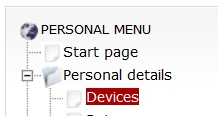
2. Click on Devices to see all available devices for your account. Click on small "gear box" bellow "Call Flow" on the right of device to enter into call flow configuration menu.

3. There are four stage of call and each of this call may have a separate action. You need to configure each of these actions separately by clicking on edit button on right of action line.
- Before call - what to do before call was terminated to your device. In the other words - unconditional forwarding. This action will be performed before your device rings.
- No Answer - what to do if you don't pick up a phone during certain number of seconds.
- Busy - what to do if your device if busy
- Failed - what to do if your device is not registered in network. (There is no IP contact between your VoIP hardware or application and our softswitch).

4. If you want to have call forwarding for all calls click "Before Call", set "Forward" and enter External number in ordinary format like 0399998289 for example for Melbourne number or 0011441223456789 for UK international.
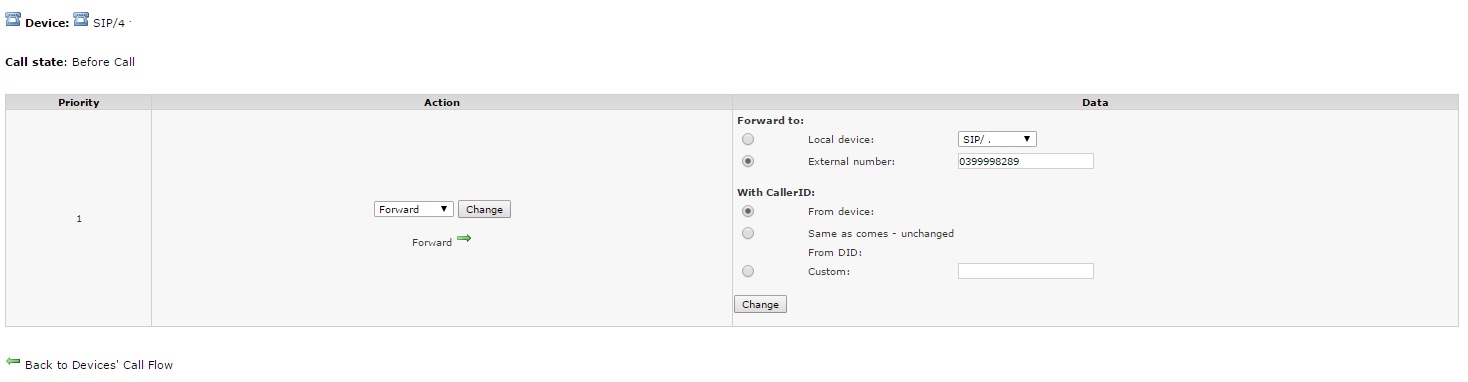
5. If you want to have Call forward redirection when nobody picks up a phone you need to click "No Answer" action, adjust Device Timeout (time how long your device rings before forwarding) and set "Action" as Forward after that. You need to enter external number to forward calls similar to example above. Click on "Change" button to apply changes and "Back to Devices" after. Now Call Forwarding will be activated if device rings "Device Timeout" number of seconds and call unattended.
5. You may also set Call Forward action "Failed" as well. If our switch cannot establish IP contact with your device call forwarded to external number.
7. Call forwarding billed according to your plan outgoing calls.
Comments
0 comments
Please sign in to leave a comment.